Configuring the File Format
The source file for an import can be any delimited (comma-separated, tab-separated) or fixed length flat file. The source file must be organized with the data in columns. The Text Import device can be configured to validate the source file.
|
File Format Page |
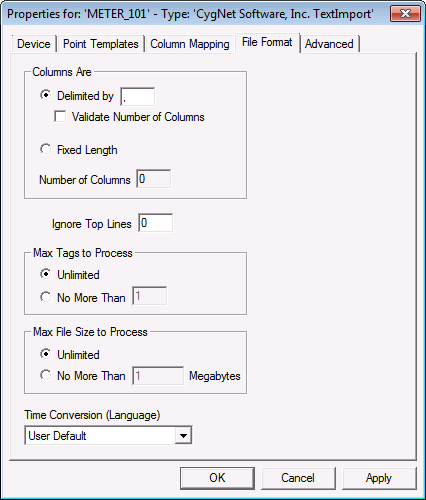
File Format Properties
Fields on the File Format page define the format of the source file.
| Property | Description |
|---|---|
|
Delimited by |
Click to enable if the source file is delimited and enter the delimiter. Common delimiters are space, tab, and comma. If the delimiter is a tab, enter the letter 'T'. Delimited by is the default setting. |
|
Validate Number of Columns |
Validate that the source file has the specified number of columns. |
|
Fixed Length |
Click to enable if the columns in the source file are fixed length. If this option is enabled you are required to enter the length of each column in the source file. |
|
Number of Columns |
Enter the number of columns in the source file. If the source file is fixed length, you must specify the number of columns (that is, this field is required). If the source file is delimited, this field is optional and is used in conjunction with Validate Number of Columns. Note: You must tab off this field before the Column Length table is adjusted. |
|
Ignore Top Lines |
You can specify to ignore the top rows of data in the source file. For example, if the source file includes one header row, set the value to 1. |
|
Max Tags to Process |
Click Unlimited to process all tags, this is the default setting. Click No More Than and enter a value to limit the number of tags. |
| Max File Size to Process | Click one of these boxes to configure the maximum import file size allowed. If you set a specific maximum file size, any larger file will fail upon import attempt. |
|
Time Conversion (Language) |
Use to accommodate the difference in representations of dates in the United States and Canada. Options are User Default, English (Canadian) and English (United States). In the United States dates are typically represented as month/day/year, while in Canada they are day/month/year. |


